
 wx.CollapsiblePane
A collapsible pane is a container with an embedded button-like control which can be used by the user to collapse or expand the pane’s contents.
Once constructed, you should use the GetPane function to access the pane and add your controls inside it (i.e., use the returned pointer from GetPane as the parent for the controls which must go in the pane, not the wx.CollapsiblePane itself!).
Note that when using this control inside a sizer, you will usually want to call wx.Window.Layout whenever its size changes due to the pane being opened or closed, in order to adjust the positions of the neighbouring controls, for example:
collpane = wx.CollapsiblePane(self, wx.ID_ANY, "Details:")

# add the pane with a zero proportion value to the 'sz' sizer which contains it
sz.Add(collpane, 0, wx.GROW | wx.ALL, 5)

# now add a test label in the collapsible pane using a sizer to layout it:
win = collpane.GetPane()
paneSz = wx.BoxSizer(wx.VERTICAL)
paneSz.Add(wx.StaticText(win, wx.ID_ANY, "test!"), 1, wx.GROW | wx.ALL, 2)
win.SetSizer(paneSz)
paneSz.SetSizeHints(win)
It is only available if USE_COLLPANE is set to 1 (the default).
 Window Styles
This class supports the following styles:
wx.CP_DEFAULT_STYLE: The default style. It includeswx.TAB_TRAVERSALandwx.BORDER_NONE.wx.CP_NO_TLW_RESIZE: By default wx.CollapsiblePane resizes the top level window containing it when its own size changes. This allows easily implementing dialogs containing an optionally shown part, for example, and so is the default behaviour but can be inconvenient in some specific cases –
 Events Emitted by this Class
Handlers bound for the following event types will receive one of the wx.CollapsiblePaneEvent wx.NavigationKeyEvent parameters.
EVT_COLLAPSIBLEPANE_CHANGED: The user expanded or collapsed the collapsible pane.
EVT_NAVIGATION_KEY: Process a navigation key event.
See also
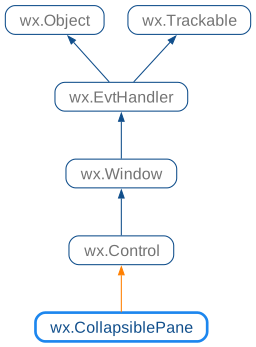
 Class Hierarchy
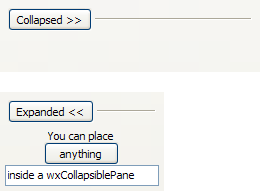
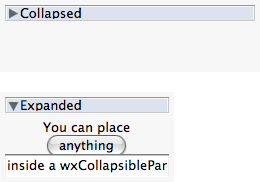
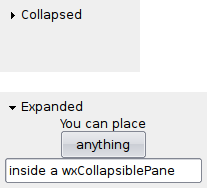
 Control Appearance
 Methods Summary
Default constructor. |
|
Collapses or expands the pane window. |
|
Same as calling Collapse(false). |
|
Returns a pointer to the pane window. |
|
Returns |
|
Returns |
 Properties Summary
See |
 Class API
- class wx.CollapsiblePane(Control)
Possible constructors:
CollapsiblePane() -> None

CollapsiblePane(parent, id=ID_ANY, label='', pos=DefaultPosition,
                size=DefaultSize, style=CP_DEFAULT_STYLE, validator=DefaultValidator,
                name=CollapsiblePaneNameStr) -> None
A collapsible pane is a container with an embedded button-like control which can be used by the user to collapse or expand the pane’s contents.
Methods
- __init__(self, *args, **kw)
 Overloaded Implementations:
__init__ (self)
Default constructor.
- Return type:
None
__init__ (self, parent, id=ID_ANY, label=’’, pos=DefaultPosition, size=DefaultSize, style=CP_DEFAULT_STYLE, validator=DefaultValidator, name=CollapsiblePaneNameStr)
Initializes the object and calls
Createwith all the parameters.- Parameters:
parent (wx.Window)
id (wx.WindowID)
label (string)
pos (wx.Point)
size (wx.Size)
style (long)
validator (wx.Validator)
name (string)
- Return type:
None
- Collapse(self, collapse=True)
Collapses or expands the pane window.
- Parameters:
collapse (bool)
- Return type:
None
- Create(self, parent, id=ID_ANY, label='', pos=DefaultPosition, size=DefaultSize, style=CP_DEFAULT_STYLE, validator=DefaultValidator, name=CollapsiblePaneNameStr)
- Parameters:
parent (wx.Window) – Parent window, must be non-null.
id (wx.WindowID) – The identifier for the control.
label (string) – The initial label shown in the button which allows the user to expand or collapse the pane window.
pos (wx.Point) – Initial position.
size (wx.Size) – Initial size.
style (long) – The window style, see
CP_flags.validator (wx.Validator) – Validator which can be used for additional data checks.
name (string) – Control name.
- Return type:
bool
- Returns:
Trueif the control was successfully created orFalseif creation failed.
- Expand(self)
Same as calling Collapse(false).
- Return type:
None
- static GetClassDefaultAttributes(variant=WINDOW_VARIANT_NORMAL)
- Parameters:
variant (WindowVariant)
- Return type:
- GetPane(self)
Returns a pointer to the pane window.
Add controls to the returned wx.Window to make them collapsible.
- Return type:
- IsCollapsed(self)
Returns
Trueif the pane window is currently hidden.- Return type:
bool
- IsExpanded(self)
Returns
Trueif the pane window is currently shown.- Return type:
bool
Properties