
 wx.aui.AuiManager
wx.aui.AuiManager is the central class of the AUI class framework.
wx.aui.AuiManager manages the panes associated with it for a particular window, using a pane’s wx.aui.AuiPaneInfo information to determine each pane’s docking and floating behaviour.
wx.aui.AuiManager uses wxWidgets’ sizer mechanism to plan the layout of each frame. It uses a replaceable dock art class to do all drawing, so all drawing is localized in one area, and may be customized depending on an application’s specific needs.
wx.aui.AuiManager works as follows: the programmer adds panes to the class, or makes changes to existing pane properties (dock position, floating state, show state, etc.). To apply these changes, wx.aui.AuiManager’s Update function is called. This batch processing can be used to avoid flicker, by modifying more than one pane at a time, and then “committing” all of the changes at once by calling Update.
Panes can be added using AddPane:
text1 = wx.TextCtrl(self)
text2 = wx.TextCtrl(self)
self.mgr.AddPane(text1, wx.LEFT, "Pane Caption")
self.mgr.AddPane(text2, wx.BOTTOM, "Pane Caption")
self.mgr.Update()
Later on, the positions and other attributes can be modified, e.g. the following will float an existing pane in a tool window:
self.mgr.GetPane(text1).Float()
Layers, Rows and Directions, Positions
Inside AUI, the docking layout is figured out by checking several pane parameters. Four of these are important for determining where a pane will end up:
Direction: Each docked pane has a direction, Top, Bottom, Left, Right, or Center. This is fairly self-explanatory. The pane will be placed in the location specified by this variable.
Position: More than one pane can be placed inside of a dock. Imagine two panes being docked on the left side of a window. One pane can be placed over another. In proportionally managed docks, the pane position indicates its sequential position, starting with zero. So, in our scenario with two panes docked on the left side, the top pane in the dock would have position 0, and the second one would occupy position 1.
Row: A row can allow for two docks to be placed next to each other. One of the most common places for this to happen is in the toolbar. Multiple toolbar rows are allowed, the first row being row 0, and the second row 1. Rows can also be used on vertically docked panes.
Layer: A layer is akin to an onion. Layer 0 is the very center of the managed pane. Thus, if a pane is in layer 0, it will be closest to the center window (also sometimes known as the “content window”). Increasing layers “swallow up” all layers of a lower value. This can look very similar to multiple rows, but is different because all panes in a lower level yield to panes in higher levels. The best way to understand layers is by running the
AUIsample.
Minimizing Panes
 Window Styles
Since wxWidgets 3.3.2, wx.aui.AuiManager supports minimizing panes which have the minimize button, see wx.aui.AuiPaneInfo.MinimizeButton . Such panes appear in the special toolbar(s) showing the buttons for all panes that can be minimized and allowing to either hide or show them again. By default, the toolbars showing the buttons for the minimized panes are created on the left, bottom and right sides of the managed window. You can change this using AllowDocksForMinPanes but note that you must still allow for the toolbars to be created on at least one side and the only way not to have any such toolbar at all is to not have any panes with minimize button. See SetDocksForMinPanesStyle and wx.aui.AuiPaneInfo.IconMin for more customization possibilities. This class supports the following styles:
wx.aui.AUI_MGR_ALLOW_FLOATING: Allow a pane to be undocked to take the form of a wx.MiniFrame.wx.aui.AUI_MGR_ALLOW_ACTIVE_PANE: Change the color of the title bar of the pane when it is activated.wx.aui.AUI_MGR_TRANSPARENT_DRAG: Make the pane transparent during its movement.wx.aui.AUI_MGR_TRANSPARENT_HINT: The possible location for docking is indicated by a translucent area.wx.aui.AUI_MGR_VENETIAN_BLINDS_HINT: The possible location for docking is indicated by gradually appearing partially transparent hint.wx.aui.AUI_MGR_RECTANGLE_HINT: The possible location for docking is indicated by a rectangular outline. Note that this flag doesn’t work, i.e. doesn’t show any hint in wxGTK and wxOSX, please use one of the hint flags above instead.wx.aui.AUI_MGR_HINT_FADE: The translucent area where the pane could be docked appears gradually. Note that this flag is not included inwx.aui.AUI_MGR_DEFAULTsince wxWidgets 3.3.0 any longer.wx.aui.AUI_MGR_NO_VENETIAN_BLINDS_FADE: This style is obsolete and doesn’t do anything, it is only defined as 0 for compatibility.wx.aui.AUI_MGR_LIVE_RESIZE: When a docked pane is resized, its content is refreshed in live (instead of moving the border alone and refreshing the content at the end). Note that this flag is included inwx.aui.AUI_MGR_DEFAULTand so needs to be explicitly turned off if you don’t need. Also note that it is always enabled inGTK3and wxOSX ports as non-live resizing is not implemented in them.wx.aui.AUI_MGR_DEFAULT: Default behaviour, combinesAUI_MGR_ALLOW_FLOATING,AUI_MGR_TRANSPARENT_HINTandAUI_MGR_LIVE_RESIZE.
 Events Emitted by this Class
Handlers bound for the following event types will receive one of the wx.aui.AuiManagerEvent parameters.
EVT_AUI_PANE_BUTTON: Triggered when any button is pressed for any docked panes.
EVT_AUI_PANE_CLOSE: Triggered when a docked or floating pane is closed.
EVT_AUI_PANE_MINIMIZE: Triggered when a pane is minimized. This event is new since wxWidgets 3.3.2.
EVT_AUI_PANE_MAXIMIZE: Triggered when a pane is maximized.
EVT_AUI_PANE_RESTORE: Triggered when a pane is restored.
EVT_AUI_PANE_ACTIVATED: Triggered when a pane is made ‘active’. This event is new since wxWidgets 2.9.4.
EVT_AUI_RENDER: This event can be caught to override the default renderer in order to custom draw your wx.aui.AuiManager window (not recommended).
See also
AUI Overview, wx.aui.AuiNotebook, wx.aui.AuiDockArt, wx.aui.AuiPaneInfo
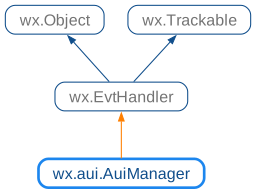
 Class Hierarchy
 Methods Summary
Constructor. |
|
|
|
Change the sides where docks for minimized panes can be created. |
|
Returns |
|
This function is used by controls to calculate the drop hint rectangle. |
|
Check if a key modifier is pressed (actually or ) while dragging the frame to not dock the window. |
|
Destroys or hides the given pane depending on its flags. |
|
Creates a floating frame in this wx.aui.AuiManager with the given parent and wx.aui.AuiPaneInfo. |
|
Tells the wx.aui.AuiManager to stop managing the pane specified by window. |
|
This function is used by controls to draw the hint window. |
|
Returns an array of all panes managed by the frame manager. |
|
Returns the current art provider being used. |
|
Returns the current dock constraint values. |
|
Returns the current wx.aui.AuiManagerOption’s flags. |
|
Returns the frame currently being managed by wx.aui.AuiManager. |
|
Calling this method will return the wx.aui.AuiManager for a given window. |
|
|
|
Returns |
|
|
|
This method is used to insert either a previously unmanaged pane window into the frame manager, or to insert a currently managed pane somewhere else. |
|
Load the layout information saved by |
|
|
|
Loads a saved perspective. |
|
Maximize the given pane. |
|
Minimize the given pane. |
|
|
|
Restore the previously maximized pane. |
|
Restore the last state of the given pane. |
|
Save the layout information using the provided object. |
|
|
|
Saves the entire user interface layout into an encoded String , which can then be stored by the application (probably using Config). |
|
Instructs wx.aui.AuiManager to use art provider specified by parameter art_provider for all drawing calls. |
|
When a user creates a new dock by dragging a window into a docked position, often times the large size of the window will create a dock that is unwieldy large. |
|
Set style of for the items representing minimized panes in the docking toolbars. |
|
This method is used to specify wx.aui.AuiManagerOption’s flags. |
|
Set the window which is to be managed by wx.aui.AuiManager. |
|
This function is used to show a hint window at the specified rectangle. |
|
Mostly used internally to define the drag action parameters. |
|
Dissociate the managed window from the manager. |
|
This method is called after any number of changes are made to any of the managed panes. |
|
Show or hide the hint window. |
 Properties Summary
See |
|
See |
|
See |
 Class API
- class wx.aui.AuiManager(EvtHandler)
Possible constructors:
AuiManager(managedWindow=nullptr, flags=AUI_MGR_DEFAULT) -> None
AuiManager is the central class of the
AUIclass framework.
Methods
- __init__(self, managedWindow=nullptr, flags=AUI_MGR_DEFAULT)
Constructor.
- Parameters:
managedWindow (wx.Window) – Specifies the window which will contain
AUIpanes. If it is not specified here, it must be set later usingSetManagedWindow.flags (int) – Specifies the frame management behaviour and visual effects with the wx.aui.AuiManagerOption’s style flags.
- Return type:
None
- AddPane(self, *args, **kw)
 Overloaded Implementations:
AddPane (self, window, pane_info)
AddPanetells the frame manager to start managing a child window.There are several versions of this function. The first version allows the full spectrum of pane parameter possibilities. The second version is used for simpler user interfaces which do not require as much configuration. The last version allows a drop position to be specified, which will determine where the pane will be added.
- Parameters:
window (wx.Window)
pane_info (wx.aui.AuiPaneInfo)
- Return type:
bool
AddPane (self, window, direction=LEFT, caption=’’)
- Parameters:
window (wx.Window)
direction (int)
caption (string)
- Return type:
bool
AddPane (self, window, pane_info, drop_pos)
- Parameters:
window (wx.Window)
pane_info (wx.aui.AuiPaneInfo)
drop_pos (wx.Point)
- Return type:
bool
- AllowDocksForMinPanes(self, directions)
Change the sides where docks for minimized panes can be created.
The argument direction must be a combination of one or more of
wx.LEFT,RIGHT,wx.TOPandBOTTOMflags.This function must currently be called before there any minimized panes, so it is recommended to call it before adding any panes at all.
Example of using this function to only allow docks showing the buttons for the minimized panes on the left and right sides of the window:
- Parameters:
directions (int)
- Return type:
None
Added in version 4.3/wxWidgets-3.3.2.
- static AlwaysUsesLiveResize(window)
Returns
Trueif live resize is always used on the current platform.If this function returns
True,AUI_MGR_LIVE_RESIZEflag is ignored and live resize is always used, whether it’s specified or not.Currently this is the case for wxOSX and
GTK3when using Wayland, as live resizing is the only implemented method there. Seewx.ClientDC.CanBeUsedForDrawingfor more details.- Parameters:
window (wx.Window) – The associated window, may be null (this parameter was added in wxWidgets 3.3.0)
- Return type:
bool
Added in version 4.1/wxWidgets-3.1.4.
Note
As of wxWidgets 3.3.0 this function always returns
False.
- CalculateHintRect(self, paneWindow, pt, offset=Point(0, 0))
This function is used by controls to calculate the drop hint rectangle.
The method first calls DoDrop() to determine the exact position the pane would be at were if dropped.
- Parameters:
paneWindow (wx.Window) – The window pointer of the pane being dragged.
pt (wx.Point) – The mouse position, in client coordinates.
offset (wx.Point) – Describes the offset that the mouse is from the upper-left corner of the item being dragged, 0 by default (since wxWidgets 3.3.0, this parameter had to be specified in the earlier versions).
- Return type:
Rect
- Returns:
The rectangle hint will be returned in screen coordinates if the pane would indeed become docked at the specified drop point. Otherwise, an empty rectangle is returned.
- CanDockPanel(self, p)
Check if a key modifier is pressed (actually or ) while dragging the frame to not dock the window.
- Parameters:
- Return type:
bool
- ClosePane(self, paneInfo)
Destroys or hides the given pane depending on its flags.
- Parameters:
paneInfo (wx.aui.AuiPaneInfo)
- Return type:
None
See also
- CreateFloatingFrame(self, parent, p)
Creates a floating frame in this wx.aui.AuiManager with the given parent and wx.aui.AuiPaneInfo.
- Parameters:
parent (wx.Window)
- Return type:
- DetachPane(self, window)
Tells the wx.aui.AuiManager to stop managing the pane specified by window.
The window, if in a floated frame, is reparented to the frame managed by wx.aui.AuiManager.
- Parameters:
window (wx.Window)
- Return type:
bool
- DrawHintRect(self, paneWindow, pt, offset=Point(0, 0))
This function is used by controls to draw the hint window.
It is rarely called, and is mostly used by controls implementing custom pane drag/drop behaviour.
Calling it is equivalent to calling
CalculateHintRectandUpdateHintwith the resulting rectangle.- Parameters:
paneWindow (wx.Window) – Window passed to
CalculateHintRect.pt (wx.Point) – Mouse position passed to
CalculateHintRect.offset (wx.Point) – Offset passed to
CalculateHintRect, 0 by default (since wxWidgets 3.3.0, this parameter had to be specified in the earlier versions).
- Return type:
None
- GetAllPanes(self)
Returns an array of all panes managed by the frame manager.
- Return type:
AuiPaneInfoArray
- GetArtProvider(self)
Returns the current art provider being used.
- Return type:
See also
- GetDockSizeConstraint(self, widthpct, heightpct)
Returns the current dock constraint values.
See
SetDockSizeConstraintfor more information.- Parameters:
widthpct (float)
heightpct (float)
- Return type:
None
- GetFlags(self)
Returns the current wx.aui.AuiManagerOption’s flags.
- Return type:
int
- GetManagedWindow(self)
Returns the frame currently being managed by wx.aui.AuiManager.
- Return type:
Window
- static GetManager(window)
Calling this method will return the wx.aui.AuiManager for a given window.
The window parameter should specify any child window or sub-child window of the frame or window managed by wx.aui.AuiManager.
The window parameter need not be managed by the manager itself, nor does it even need to be a child or sub-child of a managed window. It must however be inside the window hierarchy underneath the managed window.
- Parameters:
window (wx.Window)
- Return type:
- GetPane(self, *args, **kw)
- Overloaded Implementations:
GetPane (self, window)
GetPaneis used to lookup a wx.aui.AuiPaneInfo object either by window pointer or by pane name, which acts as a unique id for a window pane.The returned wx.aui.AuiPaneInfo object may then be modified to change a pane’s look, state or position. After one or more modifications to wx.aui.AuiPaneInfo,
wx.aui.AuiManager.Updateshould be called to commit the changes to the user interface. If the lookup failed (meaning the pane could not be found in the manager), a call to the returned wx.aui.AuiPaneInfo’s IsOk() method will returnFalse.- Parameters:
window (wx.Window)
- Return type:
GetPane (self, name)
- Parameters:
name (string)
- Return type:
- HasLiveResize(self)
Returns
Trueif windows are resized live.This function combines the check for
AlwaysUsesLiveResizeand, for the platforms where live resizing is optional, the check forwx.aui.AUI_MGR_LIVE_RESIZEflag.Using this accessor allows to verify whether live resizing is being actually used.
- Return type:
bool
Added in version 4.1/wxWidgets-3.1.4.
- InsertPane(self, window, insert_location, insert_level=AUI_INSERT_PANE)
This method is used to insert either a previously unmanaged pane window into the frame manager, or to insert a currently managed pane somewhere else.
InsertPanewill push all panes, rows, or docks aside and insert the window into the position specified by insert_location.Because insert_location can specify either a pane, dock row, or dock layer, the insert_level parameter is used to disambiguate this. The parameter insert_level can take a value of
AUI_INSERT_PANE,AUI_INSERT_ROWorAUI_INSERT_DOCK.- Parameters:
window (wx.Window)
insert_location (wx.aui.AuiPaneInfo)
insert_level (int)
- Return type:
bool
- LoadLayout(self, deserializer)
Load the layout information saved by
SaveLayout.The implementation of wx.aui.AuiDeserializer object passed to this function should be consistent with that of the serializer used to save the layout. See Advanced User Interface Sample for an example of using serializer saving the layout in
XMLformat and matching deserializer restoring the layout from it.- Parameters:
deserializer (wx.aui.AuiDeserializer)
- Return type:
None
Added in version 4.3/wxWidgets-3.3.0.
- LoadPaneInfo(self, pane_part, pane)
LoadPaneInfois similar to LoadPerspective, with the exception that it only loads information about a single pane.This method writes the serialized data into the passed pane. Pointers to UI elements are not modified.
- Parameters:
pane_part (string)
pane (wx.aui.AuiPaneInfo)
- Return type:
None
Note
This operation also changes the name in the pane information!
See also
See also
See also
- LoadPerspective(self, perspective, update=True)
Loads a saved perspective.
This function is used to load layouts previously saved with
SavePerspective, useLoadLayoutto load a layout saved withSaveLayout.A perspective is the layout state of an
AUImanaged window.All currently existing panes that have an object in “perspective” with the same name (“equivalent”) will receive the layout parameters of the object in “perspective”. Existing panes that do not have an equivalent in “perspective” remain unchanged, objects in “perspective” having no equivalent in the manager are ignored.
- Parameters:
perspective (string) – Serialized layout information of a perspective (excl. pointers to UI elements).
update (bool) – If update is
True,wx.aui.AuiManager.Updateis automatically invoked, thus realizing the specified perspective on screen.
- Return type:
bool
See also
See also
See also
- MaximizePane(self, paneInfo)
Maximize the given pane.
- Parameters:
paneInfo (wx.aui.AuiPaneInfo)
- Return type:
None
- MinimizePane(self, paneInfo)
Minimize the given pane.
Note that the pane must have the minimize button enabled for this function to work, it cannot be used to minimize the panes without it.
Minimizing a pane hides it, but it can be later shown again by the user by clicking the button corresponding to it in the minimized panes toolbar.
- Parameters:
paneInfo (wx.aui.AuiPaneInfo)
- Return type:
None
Added in version 4.3/wxWidgets-3.3.2.
See also
- ProcessDockResult(self, target, new_pos)
ProcessDockResultis a protected member of theAUIlayout manager.It can be overridden by derived classes to provide custom docking calculations.
- Parameters:
target (wx.aui.AuiPaneInfo)
new_pos (wx.aui.AuiPaneInfo)
- Return type:
bool
- RestoreMaximizedPane(self)
Restore the previously maximized pane.
- Return type:
None
- RestorePane(self, paneInfo)
Restore the last state of the given pane.
- Parameters:
paneInfo (wx.aui.AuiPaneInfo)
- Return type:
None
- SaveLayout(self, serializer)
Save the layout information using the provided object.
This function allows to use a custom serializer to save the layout information in any format, e.g. Advanced User Interface Sample shows how to save it in
XMLformat.See wx.aui.AuiSerializer documentation for more details.
- Parameters:
serializer (wx.aui.AuiSerializer)
- Return type:
None
Added in version 4.3/wxWidgets-3.3.0.
- SavePaneInfo(self, pane)
SavePaneInfois similar to SavePerspective, with the exception that it only saves information about a single pane.- Parameters:
pane (wx.aui.AuiPaneInfo) – Pane whose layout parameters should be serialized.
- Return type:
str
- Returns:
The serialized layout parameters of the pane are returned within the string. Information about the pointers to UI elements stored in the pane are not serialized.
See also
See also
See also
- SavePerspective(self)
Saves the entire user interface layout into an encoded String , which can then be stored by the application (probably using Config).
- Return type:
str
Note
You may prefer to use
SaveLayoutinstead of this function for more flexibility.See also
See also
See also
- SetArtProvider(self, art_provider)
Instructs wx.aui.AuiManager to use art provider specified by parameter art_provider for all drawing calls.
This allows pluggable look-and-feel features. The previous art provider object, if any, will be deleted by wx.aui.AuiManager.
- Parameters:
art_provider (wx.aui.AuiDockArt)
- Return type:
None
See also
- SetDockSizeConstraint(self, widthpct, heightpct)
When a user creates a new dock by dragging a window into a docked position, often times the large size of the window will create a dock that is unwieldy large.
wx.aui.AuiManager by default limits the size of any new dock to 1/3 of the window size. For horizontal docks, this would be 1/3 of the window height. For vertical docks, 1/3 of the width.
Calling this function will adjust this constraint value. The numbers must be between 0.0 and 1.0. For instance, calling SetDockSizeContraint with 0.5, 0.5 will cause new docks to be limited to half of the size of the entire managed window.
- Parameters:
widthpct (float)
heightpct (float)
- Return type:
None
- SetDocksForMinPanesStyle(self, style)
Set style of for the items representing minimized panes in the docking toolbars.
If
AUI_MIN_DOCK_ICONSis specified as part of the style, the pane icon specified bywx.aui.AuiPaneInfo.IconMinor, if it is not set,wx.aui.AuiPaneInfo.Icon, will be shown for the minimized panes.If
AUI_MIN_DOCK_TEXTis specified, the pane title will be shown (possible in addition to its icon). Note that the text will be rendered vertically for the panes shown in the toolbars docked on the left and right sides of the window and that the icons will be rotated to match the text orientation.By default, both the text and the icons are shown, which corresponds to
AUI_MIN_DOCK_BOTH. When using this style it may be desired to also useAUI_MIN_DOCK_ROTATE_ICON_WITH_TEXTstyle which makes the icons match the text orientation.This function must currently be called before there any minimized panes, so it is recommended to call it before adding any panes at all.
- Parameters:
style (int) – Combination of AuiMinDockOption elements.
- Return type:
None
Added in version 4.3/wxWidgets-3.3.2.
See also
- SetFlags(self, flags)
This method is used to specify wx.aui.AuiManagerOption’s flags.
flags specifies options which allow the frame management behaviour to be modified.
- Parameters:
flags (int)
- Return type:
None
- SetManagedWindow(self, managedWindow)
Set the window which is to be managed by wx.aui.AuiManager.
This window will often be a wx.Frame but an arbitrary child window can also be used.
Note that wx.aui.AuiManager handles many events for the managed window, including
wx.wxEVT_SIZE, so any application-defined handlers for this window should take care to callwx.Event.Skipto let wx.aui.AuiManager perform its own processing.- Parameters:
managedWindow (wx.Window)
- Return type:
None
- ShowHint(self, rect)
This function is used to show a hint window at the specified rectangle.
It can be overridden to customize the hint appearance. When overriding it,
HideHintshould normally be also overridden as well.Do not call this function directly to show the hint, use
UpdateHintinstead.- Parameters:
rect (wx.Rect) – The area where the hint window should be shown, in screen coordinates, or an empty rectangle to hide the window.
- Return type:
None
- StartPaneDrag(self, paneWindow, offset)
Mostly used internally to define the drag action parameters.
- UnInit(self)
Dissociate the managed window from the manager.
This function may be called before the managed frame or window is destroyed, but, since wxWidgets 3.1.4, it’s unnecessary to call it explicitly, as it will be called automatically when this window is destroyed, as well as when the manager itself is.
- Return type:
None
- Update(self)
This method is called after any number of changes are made to any of the managed panes.
Updatemust be invoked afterAddPaneorInsertPaneare called in order to “realize” or “commit” the changes. In addition, any number of changes may be made to wx.aui.AuiPaneInfo structures (retrieved withwx.aui.AuiManager.GetPane), but to realize the changes,Updatemust be called. This construction allows pane flicker to be avoided by updating the whole layout at one time.- Return type:
None
- UpdateHint(self, rect)
Show or hide the hint window.
This function is mostly used internally.
- Parameters:
rect (wx.Rect) – The area where the hint window should be shown, in screen coordinates, or an empty rectangle to hide the window.
- Return type:
None
Added in version 4.3/wxWidgets-3.3.0.
Properties
- AllPanes
See
GetAllPanes
- ArtProvider
See
GetArtProviderandSetArtProvider
- ManagedWindow
See
GetManagedWindowandSetManagedWindow