
 wx.PrintDialogData
This class holds information related to the visual characteristics of wx.PrintDialog.
It contains a wx.PrintData object with underlying printing settings.
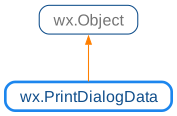
 Class Hierarchy
 Methods Summary
Default constructor. |
|
Allows or disallows selecting printing the “Current Page” in the dialog. |
|
Enables or disables the “Help” button. |
|
Enables or disables the “Page numbers” controls. |
|
Enables or disables the “Print to file” checkbox. |
|
Enables or disables the “Selection” radio button. |
|
Returns |
|
Returns |
|
Returns |
|
Returns the from page number, as entered by the user. |
|
Returns the maximum page number. |
|
Returns the maximum number of page ranges that the user can specify. |
|
Returns the minimum page number. |
|
Returns the number of copies requested by the user. |
|
Returns the page ranges to print. |
|
Returns a reference to the internal wx.PrintData object. |
|
Returns |
|
Returns |
|
Returns |
|
Returns the “print to” page number, as entered by the user. |
|
Returns |
|
Selects the “All pages” radio button. |
|
Sets the “Collate” checkbox to |
|
Selects the “Current Page” radio button when the dialog is initially shown. |
|
Sets the from page number. |
|
Sets the maximum page number. |
|
Sets the maximum number of page ranges that the user can specify. |
|
Sets the minimum page number. |
|
Sets the default number of copies the user has requested to be printed out. |
|
Sets the internal wx.PrintData. |
|
Sets the “Print to file” checkbox to |
|
Selects the “Selection” radio button. |
|
Sets the “print to” page number. |
|
 Properties Summary
See |
|
See |
|
See |
|
See |
|
See |
|
See |
|
See |
|
See |
|
See |
|
See |
|
See |
|
See |
|
 Class API
- class wx.PrintDialogData(Object)
Possible constructors:
PrintDialogData() -> None

PrintDialogData(dialogData) -> None

PrintDialogData(printData) -> None
This class holds information related to the visual characteristics of PrintDialog.
Methods
- __init__(self, *args, **kw)
 Overloaded Implementations:
__init__ (self)
Default constructor.
- Return type:
None
__init__ (self, dialogData)
Copy constructor.
- Parameters:
dialogData (wx.PrintDialogData)
- Return type:
None
__init__ (self, printData)
Construct an object from a print dialog data object.
- Parameters:
printData (wx.PrintData)
- Return type:
None
- EnableCurrentPage(self, flag)
Allows or disallows selecting printing the “Current Page” in the dialog.
This currently only has an effect under MSW, where the native dialog enables the “Current Page” radio button if this function is called to allow the user to print the current page only.
- Parameters:
flag (bool)
- Return type:
None
Added in version 4.3/wxWidgets-3.3.0.
- EnableHelp(self, flag)
Enables or disables the “Help” button.
- Parameters:
flag (bool)
- Return type:
None
- EnablePageNumbers(self, flag)
Enables or disables the “Page numbers” controls.
- Parameters:
flag (bool)
- Return type:
None
- EnablePrintToFile(self, flag)
Enables or disables the “Print to file” checkbox.
- Parameters:
flag (bool)
- Return type:
None
- EnableSelection(self, flag)
Enables or disables the “Selection” radio button.
- Parameters:
flag (bool)
- Return type:
None
- GetAllPages(self)
Returns
Trueif the user requested that all pages be printed.- Return type:
bool
- GetCollate(self)
Returns
Trueif the user requested that the document(s) be collated.- Return type:
bool
- GetCurrentPage(self)
Returns
Trueif the user requested that the current page be printed.Note that the “current page” is defined by the application.
It only makes sense to call this function if
EnableCurrentPagehad been called before, otherwise it always returnsFalse.- Return type:
bool
Added in version 4.3/wxWidgets-3.3.0.
- GetFromPage(self)
Returns the from page number, as entered by the user.
This function can’t be used if multiple page ranges were specified, use
GetPageRangesinstead.- Return type:
int
- GetMaxPage(self)
Returns the maximum page number.
- Return type:
int
- GetMaxPageRanges(self)
Returns the maximum number of page ranges that the user can specify.
- Return type:
int
Added in version 4.3/wxWidgets-3.3.0.
See also
SetMaxRanges()
- GetMinPage(self)
Returns the minimum page number.
- Return type:
int
- GetNoCopies(self)
Returns the number of copies requested by the user.
- Return type:
int
- GetPageRanges(self)
Returns the page ranges to print.
This vector contains the page ranges to be printed. If it is empty, all pages are printed, otherwise only the pages in the specified ranges are.
- Return type:
PrintPageRanges
Added in version 4.3/wxWidgets-3.3.0.
See also
SetPageRanges
- GetPrintData(self)
Returns a reference to the internal wx.PrintData object.
- Return type:
- GetPrintToFile(self)
Returns
Trueif the user has selected printing to a file.- Return type:
bool
- GetSelection(self)
Returns
Trueif the user requested that the selection be printed (where “selection” is a concept specific to the application).- Return type:
bool
- GetSpecifiedPages(self)
Returns
Trueif the user requested printing only the specified pages.The pages to print can be retrieved using
GetPageRanges.- Return type:
bool
Added in version 4.3/wxWidgets-3.3.0.
- GetToPage(self)
Returns the “print to” page number, as entered by the user.
This function can’t be used if multiple page ranges were specified, use
GetPageRangesinstead.- Return type:
int
- IsOk(self)
Returns
Trueif the print data is valid for using in print dialogs.This can return
Falseon Windows if the current printer is not set, for example. On all other platforms, it returnsTrue.- Return type:
bool
- SetAllPages(self, flag=True)
Selects the “All pages” radio button.
When called with
Truevalue, enables printing all pages. This is the default behaviour.If flag is
False, this function doesn’t do anything unless it had been called withTruevalue before and in this case it switches to printing the selected pages only (seeGetSpecifiedPages).- Parameters:
flag (bool)
- Return type:
None
- SetCollate(self, flag)
Sets the “Collate” checkbox to
TrueorFalse.- Parameters:
flag (bool)
- Return type:
None
- SetCurrentPage(self, flag=True)
Selects the “Current Page” radio button when the dialog is initially shown.
This function can only be called when
EnableCurrentPageis used as well.If flag is
False, this function doesn’t do anything unless it had been called withTruevalue before and in this case it switches to printing the selected pages only (seeGetSpecifiedPages).- Parameters:
flag (bool)
- Return type:
None
Added in version 4.3/wxWidgets-3.3.0.
See also
- SetFromPage(self, page)
Sets the from page number.
Together with
SetToPage, this function can be used to define a single range of pages to print. If you need to specify multiple ranges, useSetPageRangesinstead.- Parameters:
page (int)
- Return type:
None
Note
If
SetPageRangeswas used to specify multiple ranges, this function cannot be used as there is no single “from” page to set.
- SetMaxPage(self, page)
Sets the maximum page number.
- Parameters:
page (int)
- Return type:
None
- SetMaxPageRanges(self, maxRanges)
Sets the maximum number of page ranges that the user can specify.
This value is used as a limit for the number of page ranges that can be used in the print dialog. The default value is 64.
Currently this is only used in wxMSW.
- Parameters:
maxRanges (int)
- Return type:
None
Added in version 4.3/wxWidgets-3.3.0.
- SetMinPage(self, page)
Sets the minimum page number.
- Parameters:
page (int)
- Return type:
None
- SetNoCopies(self, n)
Sets the default number of copies the user has requested to be printed out.
- Parameters:
n (int)
- Return type:
None
- SetPrintData(self, printData)
Sets the internal wx.PrintData.
- Parameters:
printData (wx.PrintData)
- Return type:
None
- SetPrintToFile(self, flag)
Sets the “Print to file” checkbox to
TrueorFalse.- Parameters:
flag (bool)
- Return type:
None
- SetSelection(self, flag=True)
Selects the “Selection” radio button.
The effect of printing the selection depends on how the application implements this command, if at all.
This function should only be called when
EnableSelectionis used as well.If flag is
False, this function doesn’t do anything unless it had been called withTruevalue before and in this case it switches to printing the selected pages only (seeGetSpecifiedPages).- Parameters:
flag (bool)
- Return type:
None
- SetToPage(self, page)
Sets the “print to” page number.
Together with
SetFromPage, this function can be used to define a single range of pages to print. If you need to specify multiple ranges, useSetPageRangesinstead.- Parameters:
page (int)
- Return type:
None
Note
If
SetPageRangeswas used to specify multiple ranges, this function cannot be used as there is no single “to” page to set.
- __bool__(self)
- Return type:
bool
- __nonzero__(self)
- Return type:
bool
Properties
- AllPages
See
GetAllPagesandSetAllPages
- Collate
See
GetCollateandSetCollate
- CurrentPage
See
GetCurrentPageandSetCurrentPage
- FromPage
See
GetFromPageandSetFromPage
- MaxPage
See
GetMaxPageandSetMaxPage
- MaxPageRanges
See
GetMaxPageRangesandSetMaxPageRanges
- MinPage
See
GetMinPageandSetMinPage
- NoCopies
See
GetNoCopiesandSetNoCopies
- PageRanges
See
GetPageRanges
- PrintData
See
GetPrintDataandSetPrintData
- PrintToFile
See
GetPrintToFileandSetPrintToFile
- Selection
See
GetSelectionandSetSelection
- SpecifiedPages