 wx.TipWindow
Shows simple text in a popup tip window on creation.
This is used by wx.SimpleHelpProvider to show popup help. The window automatically destroys itself when the user clicks on it or it loses the focus.
You may also use this class to emulate the tooltips when you need finer control over them than what the standard tooltips provide.
See also
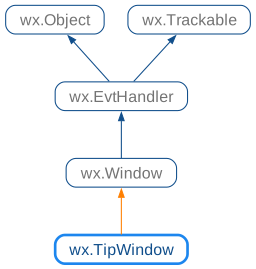
 Class Hierarchy
 Methods Summary
Default constructor. |
|
Construct the actual window object. |
|
By default, the tip window disappears when the user clicks the mouse or presses a keyboard key or if it loses focus in any other way - for example because the user switched to another application window. |
 Class API
- class wx.TipWindow(Window)
Possible constructors:
TipWindow() -> None

TipWindow(parent, text, maxLength=100) -> None
Shows simple text in a popup tip window on creation.
Methods
- __init__(self, *args, **kw)
 Overloaded Implementations:
__init__ (self)
Default constructor.
If this constructor is used,
Createmust be called later to actually create the window.Prefer using
Newinstead.- Return type:
None
Added in version 4.3/wxWidgets-3.3.2.
__init__ (self, parent, text, maxLength=100)
Use
Newinstead instead of the new code.This constructor is preserved only for backward compatibility, don’t use it in the new code.
- Parameters:
parent (wx.Window)
text (string)
maxLength (int)
- Return type:
None
- Create(self, parent, text, maxLength=100, windowPtr=nullptr, rectBounds=nullptr)
Construct the actual window object.
The tip is shown immediately.
- Parameters:
parent (wx.Window) – The parent window, must be non-null
text (string) – The text to show, may contain the new line characters
maxLength (int) – The length of each line, in pixels. Set to a very large value to avoid wrapping lines
windowPtr (TipWindow) – Simply passed to
SetTipWindowPtrbelow, please see its documentation for the description of this parameterrectBounds (wx.Rect) – If non-null, passed to
SetBoundingRectbelow, please see its documentation for the description of this parameter
- Return type:
bool
Added in version 4.3/wxWidgets-3.3.2.
- static GetClassDefaultAttributes(variant=WINDOW_VARIANT_NORMAL)
- Parameters:
variant (WindowVariant)
- Return type:
- SetBoundingRect(self, rectBound)
By default, the tip window disappears when the user clicks the mouse or presses a keyboard key or if it loses focus in any other way - for example because the user switched to another application window.
Additionally, if a non-empty rectBound is provided, the tip window will also automatically close if the mouse leaves this area. This is useful to dismiss the tip mouse when the mouse leaves the object it is associated with.
- Parameters:
rectBound (wx.Rect) – The bounding rectangle for the mouse in the screen coordinates
- Return type:
None