 wx.GraphicsPath
A wx.GraphicsPath is a native representation of a geometric path.
The contents are specific and private to the respective renderer. Instances are reference counted and can therefore be assigned as usual. The only way to get a valid instance is by using wx.GraphicsContext.CreatePath or wx.GraphicsRenderer.CreatePath .
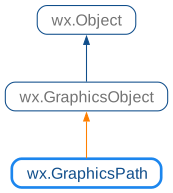
 Class Hierarchy
 Methods Summary
Adds an arc of a circle. |
|
Adds an arc (of a circle with radius r) that is tangent to the line connecting the current point and (x1, y1) and to the line connecting (x1, y1) and (x2, y2). |
|
Appends a circle around (x,`y`) with radius r as a new closed subpath. |
|
Adds a cubic Bézier curve from the current point, using two control points and an end point. |
|
Appends an ellipse fitting into the passed-in rectangle as a new closed subpath. |
|
Adds a straight line from the current point to (x,`y`). |
|
Adds another path onto the current path. |
|
Adds a quadratic Bézier curve from the current point, using a control point and an end point. |
|
Appends a rectangle as a new closed subpath. |
|
Appends a rounded rectangle as a new closed subpath. |
|
Closes the current sub-path. |
|
Gets the bounding box enclosing all points (possibly including control points). |
|
Gets the last point of the current path, (0,0) if not yet set. |
|
Returns the native path ( |
|
Begins a new subpath at (x,`y`). |
|
Transforms each point of this path by the matrix. |
|
Gives back the native path returned by |
 Properties Summary
See |
|
See |
|
See |
 Class API
- class wx.GraphicsPath(GraphicsObject)
A GraphicsPath is a native representation of a geometric path.
Methods
- AddArc(self, *args, **kw)
Adds an arc of a circle.
The circle is defined by the coordinates of its centre (x, y) or c and its radius r. The arc goes from the starting angle startAngle to endAngle either clockwise or counter-clockwise, depending on the value of clockwise argument.
The angles are measured in radians but, contrary to the usual mathematical convention, are always clockwise from the horizontal axis.
If clockwise and arc endAngle is less than startAngle, it will be progressively increased by 2pi until it is greater than startAngle. If counter-clockwise and arc endAngle is greater than startAngle, it will be progressively decreased by 2pi until it is less than startAngle.
If there is a current point set, an initial line segment will be added to the path to connect the current point to the beginning of the arc.
 Overloaded Implementations:
AddArc (self, x, y, r, startAngle, endAngle, clockwise)
- Parameters:
x (wx.Double)
y (wx.Double)
r (wx.Double)
startAngle (wx.Double)
endAngle (wx.Double)
clockwise (bool)
- Return type:
None
AddArc (self, c, r, startAngle, endAngle, clockwise)
- Parameters:
c (wx.Point2D)
r (wx.Double)
startAngle (wx.Double)
endAngle (wx.Double)
clockwise (bool)
- Return type:
None
- AddArcToPoint(self, x1, y1, x2, y2, r)
Adds an arc (of a circle with radius r) that is tangent to the line connecting the current point and (x1, y1) and to the line connecting (x1, y1) and (x2, y2).
If the current point and the starting point of the arc are different, then a straight line connecting these points is also appended. If there is no current point before the call to
AddArcToPoint, then this function will behave as if preceded by a call to MoveToPoint(0, 0). After this call, the current point will be at the ending point of the arc.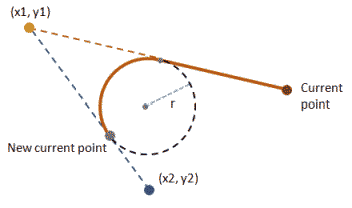
- Parameters:
x1 (wx.Double)
y1 (wx.Double)
x2 (wx.Double)
y2 (wx.Double)
r (wx.Double)
- Return type:
None
- AddCircle(self, x, y, r)
Appends a circle around (x,`y`) with radius r as a new closed subpath.
After this call, the current point will be at ( x+ r , y).
- Parameters:
x (wx.Double)
y (wx.Double)
r (wx.Double)
- Return type:
None
- AddCurveToPoint(self, *args, **kw)
- Overloaded Implementations:
AddCurveToPoint (self, cx1, cy1, cx2, cy2, x, y)
Adds a cubic Bézier curve from the current point, using two control points and an end point.
If there is no current point before the call to
AddCurveToPoint, then this function will behave as if preceded by a call to MoveToPoint(cx1, cy1).This is useful for pulling a section of a path in two directions, providing a smoother bump (or wave) in its appearance compared to a quadratic Bézier curve.
- Parameters:
cx1 (wx.Double) – The x coordinate of the first control point.
cy1 (wx.Double) – The y coordinate of the first control point.
cx2 (wx.Double) – The x coordinate of the second control point.
cy2 (wx.Double) – The y coordinate of the second control point.
x (wx.Double) – The x coordinate of the end point.
y (wx.Double) – The y coordinate of the end point.
- Return type:
None
AddCurveToPoint (self, c1, c2, e)
Adds a cubic Bézier curve from the current point, using two control points and an end point.
If there is no current point before the call to
AddCurveToPoint, then this function will behave as if preceded by a call to MoveToPoint(c1).This is useful for pulling a section of a path in two directions, providing a smoother bump (or wave) in its appearance compared to a quadratic Bézier curve.
- Parameters:
c1 (wx.Point2D) – The first control point.
c2 (wx.Point2D) – The second control point.
e (wx.Point2D) – The end point.
- Return type:
None
- AddEllipse(self, *args, **kw)
- Overloaded Implementations:
AddEllipse (self, x, y, w, h)
Appends an ellipse fitting into the passed-in rectangle as a new closed subpath.
After this call, the current point will be at ( x+ w , y+ h/2 ) .
- Parameters:
x (wx.Double)
y (wx.Double)
w (wx.Double)
h (wx.Double)
- Return type:
None
AddEllipse (self, rect)
This is an overloaded member function, provided for convenience. It differs from the above function only in what argument(s) it accepts.
- Parameters:
rect (wx.Rect2D)
- Return type:
None
Added in version 4.3/wxWidgets-3.3.0.
- AddLineToPoint(self, *args, **kw)
- Overloaded Implementations:
AddLineToPoint (self, x, y)
Adds a straight line from the current point to (x,`y`).
If current point is not yet set before the call to
AddLineToPoint, then this function will behave asMoveToPoint.- Parameters:
x (wx.Double)
y (wx.Double)
- Return type:
None
AddLineToPoint (self, p)
Adds a straight line from the current point to p.
If current point is not yet set before the call to
AddLineToPoint, then this function will behave asMoveToPoint.- Parameters:
p (wx.Point2D)
- Return type:
None
- AddPath(self, path)
Adds another path onto the current path.
After this call, the current point will be at the added path’s current point. For Direct2D, the path being appended shouldn’t contain a started non-empty subpath when this function is called.
- Parameters:
path (wx.GraphicsPath)
- Return type:
None
- AddQuadCurveToPoint(self, *args, **kw)
- Overloaded Implementations:
AddQuadCurveToPoint (self, cx, cy, x, y)
Adds a quadratic Bézier curve from the current point, using a control point and an end point.
If there is no current point before the call to
AddQuadCurveToPoint, then this function will behave as if preceded by a call to MoveToPoint(cx, cy).This is useful for pulling a section of a path in one direction, providing a sharper bump in its appearance compared to a cubic Bézier curve.
- Parameters:
cx (wx.Double) – The x coordinate of the control point.
cy (wx.Double) – The y coordinate of the control point.
x (wx.Double) – The x coordinate of the end point.
y (wx.Double) – The y coordinate of the end point.
- Return type:
None
AddQuadCurveToPoint (self, cp, e)
This is an overloaded member function, provided for convenience. It differs from the above function only in what argument(s) it accepts.
- Parameters:
cp (wx.Point2D)
e (wx.Point2D)
- Return type:
None
Added in version 4.3/wxWidgets-3.3.0.
- AddRectangle(self, *args, **kw)
- Overloaded Implementations:
AddRectangle (self, x, y, w, h)
Appends a rectangle as a new closed subpath.
After this call the current point will be at (x, y).
- Parameters:
x (wx.Double)
y (wx.Double)
w (wx.Double)
h (wx.Double)
- Return type:
None
AddRectangle (self, rect)
This is an overloaded member function, provided for convenience. It differs from the above function only in what argument(s) it accepts.
- Parameters:
rect (wx.Rect2D)
- Return type:
None
Added in version 4.3/wxWidgets-3.3.0.
- AddRoundedRectangle(self, *args, **kw)
- Overloaded Implementations:
AddRoundedRectangle (self, x, y, w, h, radius)
Appends a rounded rectangle as a new closed subpath.
If radius equals 0, then this function will behave as
AddRectangle; otherwise, after this call, the current point will be at ( x+ w , y+ h/2 ) .- Parameters:
x (wx.Double)
y (wx.Double)
w (wx.Double)
h (wx.Double)
radius (wx.Double)
- Return type:
None
AddRoundedRectangle (self, rect, radius)
This is an overloaded member function, provided for convenience. It differs from the above function only in what argument(s) it accepts.
- Parameters:
rect (wx.Rect2D)
radius (wx.Double)
- Return type:
None
Added in version 4.3/wxWidgets-3.3.0.
- CloseSubpath(self)
Closes the current sub-path.
After this call, the current point will be at the joined end point of the sub-path.
- Return type:
None
- Contains(self, *args, **kw)
- Returns:
Trueif the point is within the path.
Overloaded Implementations:Contains (self, c, fillStyle=ODDEVEN_RULE)
- Parameters:
c (wx.Point2D)
fillStyle (PolygonFillMode)
- Return type:
bool
Contains (self, x, y, fillStyle=ODDEVEN_RULE)
- Parameters:
x (wx.Double)
y (wx.Double)
fillStyle (PolygonFillMode)
- Return type:
bool
- GetBox(self)
Gets the bounding box enclosing all points (possibly including control points).
- Return type:
- GetCurrentPoint(self)
Gets the last point of the current path, (0,0) if not yet set.
- Return type:
- GetNativePath(self)
Returns the native path (
CGPathReffor Core Graphics,Pathpointer for GDI+ and acairo_path_tpointer for Cairo).- Return type:
Any
- MoveToPoint(self, *args, **kw)
- Overloaded Implementations:
MoveToPoint (self, x, y)
Begins a new subpath at (x,`y`).
- Parameters:
x (wx.Double)
y (wx.Double)
- Return type:
None
MoveToPoint (self, p)
Begins a new subpath at p.
- Parameters:
p (wx.Point2D)
- Return type:
None
- Transform(self, matrix)
Transforms each point of this path by the matrix.
For Direct2D, the current path shouldn’t contain a started non-empty subpath when this function is called.
- Parameters:
matrix (wx.GraphicsMatrix)
- Return type:
None
- UnGetNativePath(self, p)
Gives back the native path returned by
GetNativePathbecause there might be some deallocations necessary (e.g., on Cairo, the native path returned byGetNativePathis newly allocated each time).- Parameters:
p
- Return type:
None
Properties
- CurrentPoint
See
GetCurrentPoint
- NativePath
See
GetNativePath