
 wx.lib.agw.hypertreelist.TreeListHeaderWindow
A window which holds the header of HyperTreeList.
 Class Hierarchy
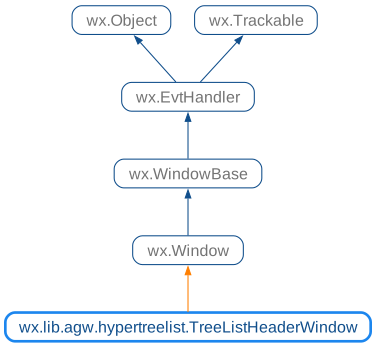
 Known Superclasses
 Methods Summary
Default class constructor. |
|
Appends a column to the |
|
Appends a column to the |
|
Shifts the |
|
Draws the column resize line on a |
|
Returns a column item, an instance of |
|
Returns the column text alignment. |
|
Returns the column text colour. |
|
Returns the total number of columns. |
|
Returns the column text label. |
|
Returns the column width, in pixels. |
|
Returns the total width of all columns. |
|
Inserts a column to the |
|
Inserts a column to the |
|
Returns |
|
Returns |
|
Handles the |
|
Handles the |
|
Handles the |
|
Redraws the column. |
|
Removes a column from the |
|
Sends a |
|
Sets/unsets the double buffering for the header. |
|
Sets a column using an instance of |
|
Sets the column text alignment. |
|
Sets the column text colour. |
|
Sets the column text label. |
|
Sets the column width, in pixels. |
|
Associate a custom renderer with the header - all columns will use it |
|
Sets the sort icon to be displayed in the column header. |
|
Returns the column that corresponds to the logical input x coordinate. |
 Class API
- class TreeListHeaderWindow(wx.Window)
A window which holds the header of
HyperTreeList.
Methods
- __init__(self, parent, id=wx.ID_ANY, owner=None, pos=wx.DefaultPosition, size=wx.DefaultSize, style=0, name='wxtreelistctrlcolumntitles')
Default class constructor.
- Parameters:
parent – the window parent. Must not be
None;id – window identifier. A value of -1 indicates a default value;
owner – the window owner, in this case an instance of
TreeListMainWindow;pos – the control position. A value of (-1, -1) indicates a default position, chosen by either the windowing system or wxPython, depending on platform;
size – the control size. A value of (-1, -1) indicates a default size, chosen by either the windowing system or wxPython, depending on platform;
style – the window style;
name – the window name.
- AddColumn(self, text, width=_DEFAULT_COL_WIDTH, flag=wx.ALIGN_LEFT, image=-1, shown=True, colour=None, edit=False)
Appends a column to the
TreeListHeaderWindow.- Parameters:
text – the column text label;
width – the column width in pixels;
flag – the column alignment flag, one of
wx.ALIGN_LEFT,wx.ALIGN_RIGHT,wx.ALIGN_CENTER;image – an index within the normal image list assigned to
HyperTreeListspecifying the image to use for the column;shown –
Trueto show the column,Falseto hide it;colour – a valid
wx.Colour, representing the text foreground colour for the column;edit –
Trueto set the column as editable,Falseotherwise.
- AddColumnInfo(self, colInfo)
Appends a column to the
TreeListHeaderWindow.- Parameters:
colInfo – an instance of
TreeListColumnInfo.
- AdjustDC(self, dc)
Shifts the
wx.DCorigin to match the position of the main window horizontal scrollbar: this allows us to always use logical coordinates.- Parameters:
dc – an instance of
wx.DC.
- DrawCurrent(self)
Draws the column resize line on a
ScreenDC.
- GetColumn(self, column)
Returns a column item, an instance of
TreeListItem.- Parameters:
column – an integer specifying the column index.
- GetColumnAlignment(self, column)
Returns the column text alignment.
- Parameters:
column – an integer specifying the column index.
- GetColumnColour(self, column)
Returns the column text colour.
- Parameters:
column – an integer specifying the column index.
- GetColumnCount(self)
Returns the total number of columns.
- GetColumnText(self, column)
Returns the column text label.
- Parameters:
column – an integer specifying the column index.
- GetColumnWidth(self, column)
Returns the column width, in pixels.
- Parameters:
column – an integer specifying the column index.
- GetWidth(self)
Returns the total width of all columns.
- InsertColumn(self, before, text, width=_DEFAULT_COL_WIDTH, flag=wx.ALIGN_LEFT, image=-1, shown=True, colour=None, edit=False)
Inserts a column to the
TreeListHeaderWindowat the position specified by before.- Parameters:
before – the index at which we wish to insert the new column;
text – the column text label;
width – the column width in pixels;
flag – the column alignment flag, one of
wx.ALIGN_LEFT,wx.ALIGN_RIGHT,wx.ALIGN_CENTER;image – an index within the normal image list assigned to
HyperTreeListspecifying the image to use for the column;shown –
Trueto show the column,Falseto hide it;colour – a valid
wx.Colour, representing the text foreground colour for the column;edit –
Trueto set the column as editable,Falseotherwise.
- InsertColumnInfo(self, before, colInfo)
Inserts a column to the
TreeListHeaderWindowat the position specified by before.- Parameters:
before – the index at which we wish to insert the new column;
colInfo – an instance of
TreeListColumnInfo.
- IsColumnEditable(self, column)
Returns
Trueif the column is editable,Falseotherwise.- Parameters:
column – an integer specifying the column index.
- IsColumnShown(self, column)
Returns
Trueif the column is shown,Falseif it is hidden.- Parameters:
column – an integer specifying the column index.
- OnMouse(self, event)
Handles the
wx.EVT_MOUSE_EVENTSevent forTreeListHeaderWindow.- Parameters:
event – a
MouseEventevent to be processed.
- OnPaint(self, event)
Handles the
wx.EVT_PAINTevent forTreeListHeaderWindow.- Parameters:
event – a
PaintEventevent to be processed.
- OnSetFocus(self, event)
Handles the
wx.EVT_SET_FOCUSevent forTreeListHeaderWindow.- Parameters:
event – a
FocusEventevent to be processed.
- RefreshColLabel(self, col)
Redraws the column.
- Parameters:
col – the index of the column to redraw.
- RemoveColumn(self, column)
Removes a column from the
TreeListHeaderWindow.- Parameters:
column – an integer specifying the column index.
- SendListEvent(self, evtType, pos)
Sends a
ListEventfor the parent window.- Parameters:
evtType – the event type;
pos – an instance of
wx.Point.
- SetBuffered(self, buffered)
Sets/unsets the double buffering for the header.
- Parameters:
buffered –
Trueto use double-buffering,Falseotherwise.
Note
Currently double-buffering is only enabled by default for Windows XP.
- SetColumn(self, column, info)
Sets a column using an instance of
TreeListColumnInfo.- Parameters:
column – an integer specifying the column index;
info – an instance of
TreeListColumnInfo.
- SetColumnAlignment(self, column, flag)
Sets the column text alignment.
- Parameters:
column – an integer specifying the column index;
flag – the new text alignment flag.
See also
TreeListColumnInfo.SetAlignment()for a list of valid alignment flags.
- SetColumnColour(self, column, colour)
Sets the column text colour.
- Parameters:
column – an integer specifying the column index;
colour – a valid
wx.Colourobject.
- SetColumnText(self, column, text)
Sets the column text label.
- Parameters:
column – an integer specifying the column index;
text – the new column label.
- SetColumnWidth(self, column, width)
Sets the column width, in pixels.
- Parameters:
column – an integer specifying the column index;
width – the new width for the column, in pixels.
- SetCustomRenderer(self, renderer=None)
Associate a custom renderer with the header - all columns will use it
- Parameters:
renderer – a class able to correctly render header buttons
Note
the renderer class must implement the method DrawHeaderButton
- SetSortIcon(self, column, sortIcon, colour=None)
Sets the sort icon to be displayed in the column header.
The sort icon will be displayed in the specified column number and all other columns will have the sort icon cleared.
- Parameters:
column – an integer specifying the column index;
sortIcon – the sort icon to display, one of
wx.HDR_SORT_ICON_NONE,wx.HDR_SORT_ICON_UP,wx.HDR_SORT_ICON_DOWN.colour – the colour of the sort icon as a wx.Colour. Optional. Set to
Noneto restore native colour.
- XToCol(self, x)
Returns the column that corresponds to the logical input x coordinate.
- Parameters:
x – the x position to evaluate.
- Returns:
The column that corresponds to the logical input x coordinate, or
wx.NOT_FOUNDif there is no column at the x position.